End of an era – MAX discontinued

I have written at quite some length on here about my use of MAX equipment for running my heating system. It has worked extremely well and I have been very happy with the excellent quality of the kit and the low prices.

I found I needed an extra thermostat, but on looking around the usual sources they were nowhere to be found. A bit more digging and my worst fears were realised – the range has now been discontinued by the manufacturer (ELV). The UK has always been a minor market for this stuff with Germany and other European countries seeming far more interested. The press release which puts the final nail in the coffin is here:

Or courtesy of Google Translate for those whose German isn’t up to it:

Whilst they are dressing it all up as a good news story, for me at least it feels like bad news. They have always had a range of different product lines, and the HomeMatic line have always been nice but much more expensive, and also more complicated to control if you step outside their ecosystem. I never made any use of the cloud offering so that’s not an issue to me.

I don’t see HomeMatic IP as a viable solution really partly because of the cost, but also because it will be much more difficult to incorporate into my control system. Fortunately for me I don’t need much more, probably one will be enough, but it is still a bit sad that the options are becoming more limited. If I was starting again now I’m not really sure what I’d do. There are some options out there but I don’t think any are easy.

ELV are offering a like-for-like exchange of MAX for HomeMatic IP thermostats… but sadly the Ts&Cs only apply to a number of European countries which does not include the UK. I’m not really surprised by this, they never really seem to have engaged with the UK as a market and I tended to buy mine from European retailers like Conrad or even direct from ELV.

https://de.elv.com/max-wechselangebot

It does mean that I am now going to try and hoard as many as I can find, there are one or two job lots that go on eBay but not very often. So if you have any of these lying around… please let me know! I’d also be very interested to hear if anyone has had success with other similar systems especially when coupled with FHEM or some other computer controlled system. Fibaro are doing some very expensive Z-Wave heads:

https://www.fibaro.com/en/products/the-heat-controller/

All the other options are similarly expensive and not as easy to integrate.

I’m not planning to change anything and hopefully my existing installation will continue to work fine for a long time to come. However it does leave a real gap in the market, and in the UK at least I am not optimistic about it being filed.

Occupancy Detection for Heating Control

Since I’ve been tinkering with control systems in general I have been thinking about new ways of interconnecting them to get additional functionality out. One of my main interests in the heating control project is trying to reduce the amount of gas the system is consuming and thus the overall cost of the heating. I’m also trying to improve the overall efficiency of the system by trying to match the heating supply to the demand.

I’ve wondered for a long time about the time the house is unoccupied, and what the best thing is to do with heating. In the past I have tried using the time clock to turn the heating off during times of absence, but this doesn’t really work because it isn’t that easy to accurately time periods when the house is empty. So if you are in when you are meant to be out the house is cold, and vice versa.

However once I installed the Texecom panel  I realised that of course one can easily derive simply occupancy data from whether the alarm is set or not. We always set the alarm when we go out, so if I could read the status of the alarm and use this to adjust the heating control it would give me a 100% reliable trigger and so the risk of sitting in a cold house or heating an empty one would be reduced.

There are numerous means of getting an output from the panel. and Fhem (which controls the heating) is pretty good at monitoring events and doing something as a result. However it wasn’t immediately obvious how best to do it.

I settled in the end on using an Arduino with the Firmata  fimware. I’d never heard of this before, but it is directly supported by Fhem and allows direct access to the various inputs and outputs on the Arduino into Fhem. I bought a very cheap Arduino Nano clone from ebay for about £3:ArduinoNanoFront_3_sm

Then I loaded the Firmata firmware on to it using the usual Arduino software. I won’t go into the detail of this as it’s extensively covered elsewhere but will answer any questions about this.

The next thing to do was to get a signal from the panel into the Nano. This is quite simple, as the panel has a number of programmable outputs. These are highly configurable via Wintex and the output can be set high (or pulled low) in a whole range of different conditions. All I need is for it to change an output when the panel is set.

The Arduino has loads of inputs and outputs, and for this you need a digital input – either on or off to represent armed or disarmed. I was initially unsure about how this would work, especially as it runs at 5V and the alarm panel is based on 12V. I am using the ‘panel outputs’ of which there are two on the Premier Elite 48 (and more on the bigger panels) – labelled ’12’ below:

outputs

The fact that they are labelled with a ‘-‘ sign is significant, and indicates that they are so-called ‘open collector‘ inputs. This means that rather than switching 12V on to the line, instead it allows ‘sinking’ a voltage from the board. So you can connect the output to one of the digital output lines on the Arduino, and the voltage differential doesn’t matter because it is not putting 12V into it.

So what I have done is to connect one of the digital inputs (so I have used D1) to OP1- on the panel above. I’ve not got a great picture of it, but it just a single wire linking soldered to the D1 point on the Arduino to the OP- screw terminal. I’ve fixed the Nano inside the alarm box along with the other bits.I do now have quite a few USB cables coming out of the alarm box… it might be good to have a USB hub in there but I’m running out of space!

That’s the hardware side done – next post I’ll address the software side using Wintex and FHEM.

Boiler Control using MAX hardware

So now I’ve got a number of MAX radiator valves around the house which are linked up to FHEM which is providing some monitoring and control. I’ll go into some more detail on the software side in another post. However, I realised that the amount of value that you get out of this system is pretty limited unless you can find a way of controlling the boiler.

Most of the other systems like this which I have seen do have some form of relay or control (sometimes called a ‘boiler interlock’) so that the individual zones can ‘call for hear’ and similarly the boiler shuts off automatically when heat isn’t required. Without this all you have is some fancy valves but the boiler control is still only by a basic thermostat or timer.

Unfortunately, there is nothing available in the MAX range which does this. This seems to me a major omission as all the others do (FHT, HomeMatic, evoHome etc). I had a bit of a problem, as I needed to be able to address the relay via FHEM on the computer, but the CUL device can only be used in one mode at a time. So if I wanted to use a relay from a different system (eg HomeMatic) I would need to have a second device to do so which will obviously cost a lot more.

I thought about this a lot because I really didn’t want to spend a lot of money on this and I didn’t want to overcomplicate matters. After a bit of digging around I found this:

max-zwischenstecker-v-web-a528e9e5

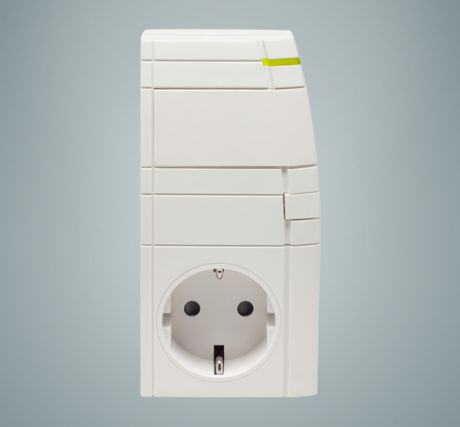
This is one of the MAX products (details here ) although it is a little obscure. To be honest I’m struggling to work out when exactly anyone would use. It is basically a switched mains plug just like many which you find in home automation systems. However it is designed to work as part of a MAX system. So far as I can make out from the documentation it is supposed to be used with electric heaters or pumps that plug in to the wall. I’ve never seen anything quite like that… but maybe they have them in Germany.

The good news is that because it is a MAX device I can address it from FHEM without using any additional devices. However it wasn’t immediately obvious how I would use it to switch my boiler directly, which used a 240V switched circuit which normally goes to the thermostat. I had a few ideas, including stripping the whole unit down and somehow wiring the relay in directly and whilst I did get the board out to have a look there was no obvious way of doing this. The fact that it uses a European plug (aka Schuko) is another obstacle.

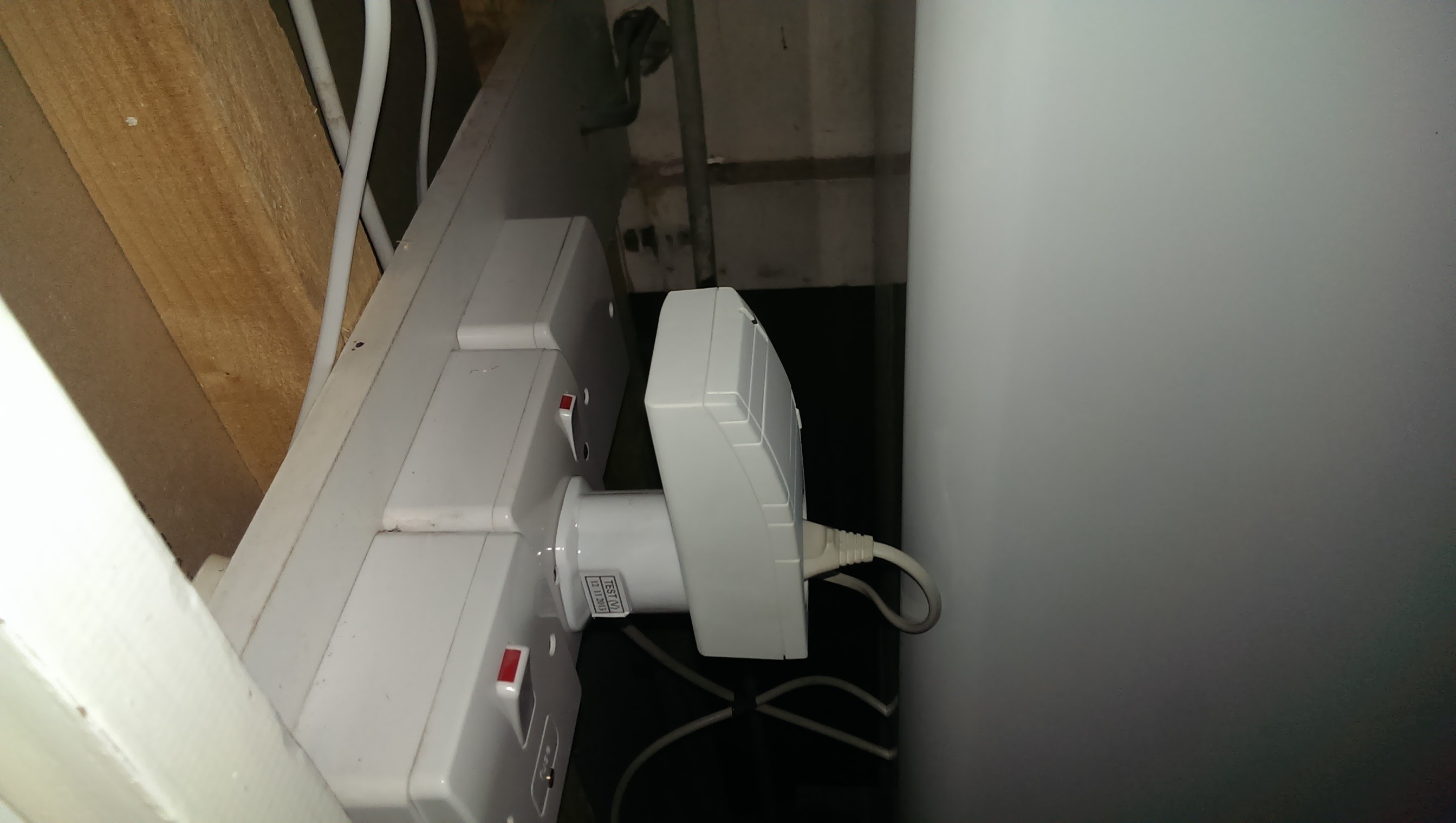
So I considered a few options, including buying a Schuko socket to plug it into. However as above I was trying to keep the costs down and keep it simple. My boiler already has main supply to the existing thermostat receiver so it’s fairly easy to wire things in. So what I have ended up with is starting with a UK socket, then an adaptor, then the switch unit, and then an older shaver plug with a flying lead.

The other end of the lead goes to a huge and rather OTT mains relay which I got for a few pounds from ebay:

1223200123

Luckily it fits quite nicely into a blanked off single switch box, with the wires poked in through a hole in the bottom and fixed to the screw terminals on the base. The output from the flying lead on the switch goes to energise the coil, and the output contacts are wired to the thermostat input. So I’m using a mains relay to switch a relay to switch the boiler on! It’s a bit convoluted… but it works!

The end result in the boiler cupboard looks like this:

IMG_20160104_220538

So a little inelegant perhaps… but I’m happy with the result.

In FHEM it can be configured as a MAX thermostat (so it appears exactly the same as one of the radiators) but it can be switched on and off by sending an ‘on’ or ‘off’ command to it.

I’ll cover the FHEM configuration in a bit more detail in the next post

Moving to MAX!

When I moved house I started to look at expanding the heating control system, especially given that the new house was much colder than the old one. I started by looking at the FS20 kit I already had, but it was looking really expensive being around £70 per room. On top of that, I was unfortunate in that every radiator in the new house had Vaillant TRVs which are a non-standard fitting and so I’d need an adaptor for each as well.

I was pleased to stumble upon Andy Carter’s blog in which he has gone on a very similar journey, and this introduced me to the MAX! range of products (German language link but but Chrome translates it pretty well). These are produced by a German company called eQ-3 who make a whole range of home automation products. There seem to be two ranges – MAX! and HomeMatic. MAX appears to be a more budget model and is restricted to heating control. HomeMatic is a bit smarter and has a much wider range of modules for all sorts of things including relays, sensors etc but it also has the equivalent of the heating control as well.

The basic system consists of a replacement TRV head and an optional wall controller which directly associated with it. There are now three different types of these although the differences between them are pretty minor.

The big plus for me was that (unless you wanted the wall control) these were a single unit rather than two, and such were substantially cheaper (£25 all in). This made it much more viable to buy in a significant number of them, and in a number of ways they were better than the FS20 units. I liked the large backlit displays and the ease of controlling them, and it was clear that they were also well supported in software. Best of all, the CUL dongle can be used to speak the MAX protocol and so I didn’t need to buy the MAX cube controller.

As I started to put them I learned a few things:

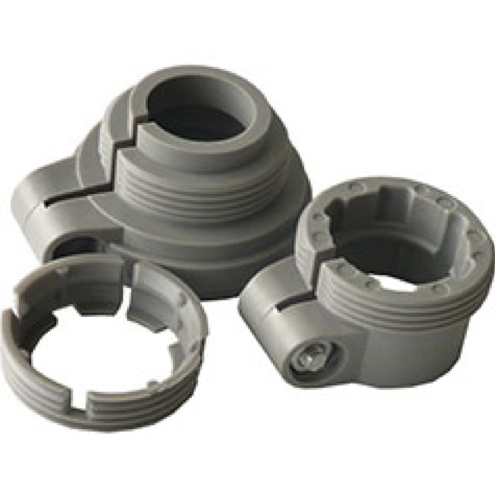
There are various different types of TRV fitting depending on manufacturer. The MAX heads come with various adaptors for the most common ones, and will screw directly on to others. I have ended up standardising on Danfoss valves in the house, for no really good reason except that they are good quality and look nice. The supplied adaptor does work although it a bit of a pig to fit. You get this set of adaptors each time:
danfossssss

The Danfoss one is the far right. You have to remove the bolt, and snap the collar around the valve mechanism. Then you tighten the bolt and screw the valve itself on. Once this is done it seems to work well and is a tight fit. However, I’ve decided that in future I’ll buy valve bodies that don’t need an adaptor at all as this is much easier.

The second thing is that in the UK normal TRVs seem to generally fitted vertically. This does appear to be a matter of convention, although I have read that it makes more sense for them to be mounted horizontally instead because it moves the body of the valve away from the radiator itself and means that the airflow is more representative of the temperature in the room. Also, the MAX valve are obviously designed to be mounted the same way, as if you do mount them vertically the display is upside down. So on all my new radiators I’ve asked the plumber to fit the valves horizontally and they look much better this way. It is easier to read the display and to operate the valves. However I do have some on old valves which are upside down for the time being. It doesn’t seem to affect the way they work, fortunately.

The third thing I’ve found is that installing these valves on their own doesn’t really get you very far! I’ve had quite a few of them in the house, but I don’t think you get very much benefit until you find a way to interlock what the valves are doing with the boiler. This unfortunately is easier said than done… but I have found a way to be described in the next post.